자바 스크립트는 타입을 명시하지 않아도 된다
자바
String str = "a";
자바 스크립트
var str = "a"; // var는 함수단위 스코프
let str1 = "a"; // let은 블록단위 스코프
const str2 = "a"; // const는 블록단위 스코프 + final
자바는 모든 코드가 class 안에 작성된다
자바스크립트는 class가 없어도 코드를 작성할 수 있다
function add(a, b) {
return a+ b;
}
console.log(" ");
- 콘솔창에 출력
<script>

    console.log("hello");

</script>
OR 조건
- 자바스크립트에서는 OR조건을 사용하면 마지막 값이나 false가 아닌 값이 출력된다
console.log(false || false || true);
console.log(false || false || "hello");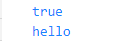
- 자바스크립트 OR조건에서 0이나 null 등도 false 조건으로 판단한다
console.log(0 || null || "hello");
if
- if나 while의 조건안에 boolean이 아닌 값이 들어가면 true를 대신할 수 있다
    const data = "aaa";

    if(data) {
        console.log("널이 아닙니다.");
    }
typeof
- typeof를 사용해서 타입을 판단할 수 있다
    const str3 = "12";
    console.log(typeof str3);
==, ===
- 자바스크립트에서 == 는 값만 비교한다
    console.log("12" == 12);
    console.log(true == 1);
    console.log(false == 0);
    console.log(undefined == null);
- ===는 값과 타입 모두 비교한다
console.log("12" === 12);
정수 나누기
- 자바 정수 / 정수 = 정수
- 자바스크립트 정수 / 정수 = 정수 또는 실수
console.log(3/2);
형변환
    const str4 = String(12);
    console.log(typeof str4);
    const num1 = Number(str4);
    console.log(typeof num1);
문자열
- 문자열과 char는 공유된다
- 홑따옴표도 문자열이다
    console.log("a");
    console.log(typeof 'a');
백틱
- 백틱도 문자열이다
- 백틱을 사용하면 문자열포맷팅이 가능하다
    // 백틱도 문자열이다
    console.log(`a123`);

    // 백틱을 사용하면 문자열포맷팅이 가능하다
console.log(`a123 ${str}1`);'프로그래밍 언어와 기술 > JavaScript' 카테고리의 다른 글
| [JavaScript] 전개 연산자 (0) | 2023.07.11 |
|---|---|
| [JavaScript] 함수가 들어가는 메소드, 구조 분해 할당 (0) | 2023.07.11 |
| [JavaScript] 반복문 (0) | 2023.07.11 |
| [JavaScript] 객체 만들기 (0) | 2023.07.11 |
| [JavaScript] 함수 만들기 (0) | 2023.07.11 |