서버가 없을때 JSON 연습용 사이트
https://jsonplaceholder.typicode.com/posts/1
Json Parser
Json Parser Online
json.parser.online.fr
fetch()
.then((response) => response.json()) ~
- 통신용 메소드
- fetch함수를 실행하고 뒤에 then catch finally를 선택해서 입력
- then catch finally는 콜백함수를 매개변수로 받는다
- json 데이터를 받는 주소면
- .then((response) => response.json()) 코드 고정
- json()을 사용하면 응답 내용에서 json데이터를 자바스크립트 객체로 바꿔준다
    <script>
        // 통신용 메소드
        // fetch함수를 실행하고 뒤에 then catch finally를 선택해서 입력
        // then catch finally는 콜백함수를 매개변수로 받는다
        fetch("https://jsonplaceholder.typicode.com/posts/1")
        // json 데이터를 받는 주소면
        // .then((response) => response.json()) 코드 고정
        // json()을 사용하면 응답 내용에서 json데이터를 자바스크립트 객체로 바꿔준다
        .then((response) => {
            console.log(response);
            return response.json();
        })
        .then((result)=>{
            console.log(result);
        });
    </script>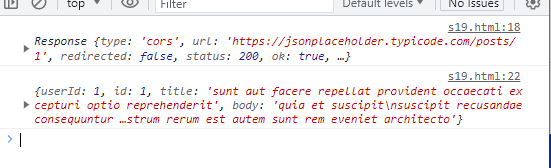
버튼을 누르면 getData 함수 실행
- id가 first인 태그에 title 넣기
- 1~100번의 랜덤한 post 가져와서 사용
- 비동기 통신
- 언제 들어올지 모르는 데이터를 다룰 때 사용
<body>
    <button onclick="getData()">랜덤</button>
    <h1 id="first"></h1>
    <script>
        const getData = () => {
            const randomNum = Math.floor(Math.random()*100 + 1);
            fetch("https://jsonplaceholder.typicode.com/posts/" + randomNum)
            .then((response) => response.json())
            .then((result)=>{
                console.log(result);
                document.querySelector("#first").innerHTML = "제목 : " + result.title;
                console.log("fetch함수 내부");
            });
            console.log("fetch함수 이후");
        }
    </script>
</body>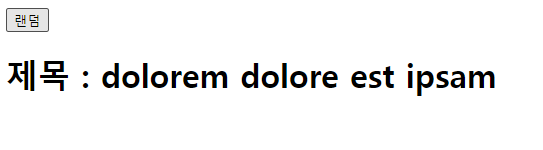
* 순차적으로 실행되는 것이 아니라 결과가 들어오면 실행 되도록 만들어져 있음

'프로그래밍 언어와 기술 > JavaScript' 카테고리의 다른 글
| [JavaScript] 프로미스 (0) | 2023.07.13 |
|---|---|
| [JavaScript] 실습 - fetch, 반복문 사용해서 li에 값 채우기 (0) | 2023.07.12 |
| [JavaScript] 실습 - 배경이 흰색, 검정색으로 바뀌는 토글버튼 만들기 (0) | 2023.07.12 |
| [JavaScript] localStorage (0) | 2023.07.12 |
| [JavaScript] 키보드 이벤트 (0) | 2023.07.12 |