스타일 변경
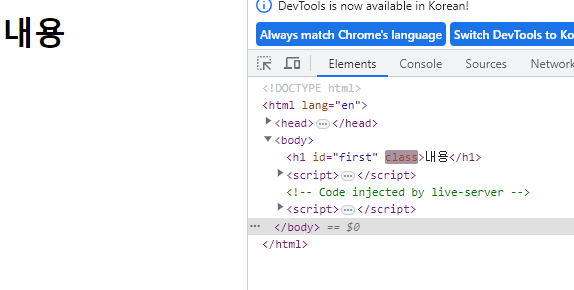
    <h1 id="first">내용</h1>
    <script>
        // 스타일 변경
        const firstTag = document.querySelector("#first");
        firstTag.style.color = "red";
    </script>
* 하지만 이렇게 사용하는 것은 추천하지 않는다.
CSS를 id나 class 등으로 컨트롤할 수 없을 경우에만 사용
클래스를 추가해서 스타일 변경
<head>
    <style>
        .red{
            color: red;
        }
    </style>
</head>

<body>
    <h1 id="first">내용</h1>
    <script>
        // 스타일 변경
        const firstTag = document.querySelector("#first");
        // 이렇게 사용하는 것은 추천하지 않는다
        // firstTag.style.color = "red";

        // 클래스를 추가 및  삭제해서 스타일 변경
        firstTag.classList.add("red");

    </script>
</body>
클릭시 색 변경
    <h1 id="first">내용</h1>
    <script>
        firstTag.onclick = () =>{
            if (firstTag.classList.contains("red")) {
                firstTag.classList.remove("red");
            } else {
                firstTag.classList.add("red");
            }
        }
    </script>
클릭시 검정색 빨간색 변경됨

'프로그래밍 언어와 기술 > JavaScript' 카테고리의 다른 글
| [JavaScript] 키보드 이벤트 (0) | 2023.07.12 |
|---|---|
| [JavaScript] 마우스 이벤트(태그에 기능 추가, 삭제) (0) | 2023.07.12 |
| [JavaScript] 태그 넣기, insertAdjacentHTML (0) | 2023.07.12 |
| [JavaScript] 태그, onclick, 새로운변수 (0) | 2023.07.12 |
| [JavaScript] window.document.getElement~, querySelector (0) | 2023.07.12 |